Work & Productivity apps and guides
One unfinished task is a better starting point than a feature list. I group practical work tools here; start with your bottleneck, whether it involves cloud storage, project management or remote desktop access.
15 apps · 8 guides · top pick first
See the top pickWork & Productivity: the shortlist
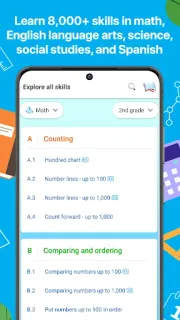
IXL or another app? Match 5 picks to the right task
I’ll sort five apps by the job each actually handles, so you can pick a learning tool without mistaking an account or work app for one.
- IXL Targeted K–12 skill practice with adaptive questions and answer explanations.
- Plantify Identifying a plant in front of you and finding gardening care guidance.
- Joist Invoices for Preparing contractor estimates and invoices from job details.
- Boost Mobile Managing a Boost Mobile account.
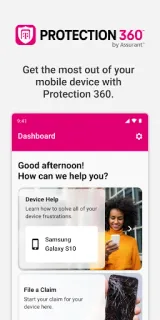
- Protection 360™ Accessing device protection benefits tied to the service.
Find a tool for the task blocking your work
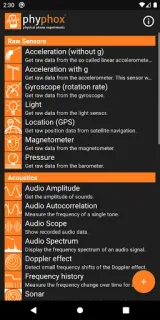
 phyphoxAndroidOur top pickExplore phone sensors with guided experiments and exportable results.
 GmailAndroidKeep recruiter replies findable; check what survives a lost connection.
 Free Adblocker BrowserAndroidBlock page ads in one browser; weigh its built-in privacy tools first.
 ZutobiAndroidStudy road rules and quiz yourself before heading to the DMV.
 TermiusAndroidKeep server connections, terminal sessions and repeat commands close at hand.
 IXLAndroidTargeted practice for school skills, with feedback when answers go wrong.
 Microsoft PowerPointAndroidEdit a deck on the move, then practise your delivery with Presenter Coach.
 Protection 360™AndroidCheck coverage, start a claim and reach tech support from one place.
 Picture InsectAndroidSnap a bug, check its ID, then explore the insect guide.
 Boost MobileAndroidSee account details and handle Boost tasks in one place when you have a connection.
 Joist Invoices forAndroidBuild an estimate at the jobsite, then keep client details and invoices together.
 PlantifyAndroidTurn an unfamiliar leaf into a starting point for plant care.
 LingoDeerAndroidBuild sentences through guided lessons, then reinforce them with targeted review.
 Firefox Fast & PrivateAndroidSet your search engine, tracking protection and private-tab lock before browsing.
 DayforceAndroidCheck shifts, request time off and handle work tasks from your phone.
Work & Productivity guides
- How-to · GmailGmail: Build a Reply Shelf Without Losing Customer Follow-upsKeep reply wording close and unanswered customer threads closer, with a phone-friendly Gmail routine.
- Tips · GmailGmail: 6 Habits That Keep Cleared Mail From Piling UpDeleting the same senders again? I use six Gmail controls to tackle repeat clutter at its source.
- How-to · GmailGmail: File Receipts Automatically Without Hiding InvoicesBuild a narrow Gmail filter, check its matches, and keep payment requests out of the archive.
- Tips · phyphoxphyphox: 6 tips for remote control and clean exportsKeep your hands off the phone during a run, then leave with a usable data file.
- Troubleshooting · Protection 360™Protection 360™ coverage not showing? Check these 5 thingsCoverage details missing? Start with the number used to register, then work through the app checks.
- Tips · Picture InsectPicture Insect: 7 ways to get a clearer bug IDA blurry wing or busy background can send a bug search sideways. Start with the photo.


Other categories
How we pick Work & Productivity apps
I use three questions to sort this shelf. 1. What exact task can I finish with the app, rather than merely organize? 2. Does it fit the files, accounts or equipment that task already involves? 3. Can I hand off the result without making someone else repeat my work? A measurement tool and a remote access tool deserve different checks. I favor a clear purpose over a crowded dashboard, then use the review to unpack setup and everyday friction.
Work & Productivity FAQ
How do I choose between a focused tool and an all-purpose app?
I write down the next task I need to finish. If one focused tool handles it cleanly, I have little reason to add a larger workspace.
What matters when an app handles work files?
I check supported file types, export options and account requirements. For shared work, I also check whether the recipient can open the result using their existing tools.
Should I allow every permission a work app requests?
I match each permission to the task I want to perform. On Android, I can review access under Settings > Apps > the app name > Permissions.