You’re outside a meeting room when a colleague asks for one small change: move a chart, tighten a slide, then present. PowerPoint for Android is built for that handoff between editing and presenting, so you can open recently used files, make changes and run a slideshow without returning to a computer. If your work already lives in PowerPoint, keeping the familiar slide format on your phone can make a last-minute review less awkward.
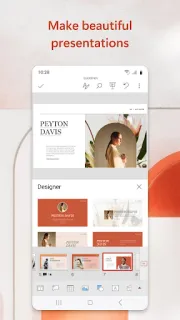
The app lets you create, edit and view presentations, using templates for reports and other decks. Slides can include music, graphics and charts, and you can present from the phone. The listing also describes syncing presentations across devices to reduce version confusion. Presenter Coach offers a way to practise with a timer and real-time suggestions about pacing and filler words. That may suit a short rehearsal before a team update; it is not a substitute for checking how your slides look on the screen where you’ll present.
Keep two checks in mind before making it your only work tool. The app is free to install, offers in-app purchases, and the developer points to Microsoft 365 as a way to unlock the full Office experience across devices. Check which editing and presentation features fit your account before planning a workflow around them. Also consider your screen: a phone is handy for corrections and review, but detailed layouts, dense charts and long documents are easier to inspect on a larger display. If your deck depends on cloud storage, confirm that the files you need are accessible from your account and device.
I’d install PowerPoint if you already share slide decks, need to review a presentation between appointments, or want to rehearse a talk with Presenter Coach. It can also fit a workplace that uses business email and online courses to circulate presentations, though it is not a replacement for a dedicated CRM or invoicing app. Skip it if you rarely handle slides or expect a phone to be your comfortable workspace for building complex decks. Check the Google Play button just below to open the listing and confirm the app suits your setup.


 TipsMicrosoft PowerPoint