The full review

An interview address is buried in an email, the train loses signal, and opening Gmail suddenly feels like a gamble. For a job search spread across dozens of applications, I judge this app by three things: whether I can find the right conversation, keep useful mail available, and avoid mistaking a queued reply for a sent one. My unexpected finding is that the most important preparation happens before the journey, not in the search box. Gmail can help through patchy reception, but I would never treat its Android inbox as a complete offline archive.
Part 1 · 1 of 31. Put the application account within one tap
I would start with the account used on my applications rather than a combined inbox. Tap the profile picture, choose Add another account if needed, then select the application account. Multiple account support is useful, but separating recruiter replies from personal messages matters more to me than seeing everything together. Before composing, I check the sender address rather than trusting the profile picture alone.
Next I open Menu > Settings > the application account and check Sync Gmail. For a supported Gmail account, Days of mail to sync controls the recent window kept in sync. I choose a window that covers active conversations, then allow syncing on a reliable connection. That is preparation, not a guarantee that every attachment will be available on the train.
Part 1 · 2 of 32. Search for the employer, then the missing detail
With dozens of applications, I would use the search box as the main entrance. A company name plus interview is a better starting point than scrolling through automated acknowledgments. If I know the sender, from: narrows the search; has:attachment helps locate messages carrying documents. On a working connection, these tools make Gmail considerably more useful than an inbox organized only by arrival time.
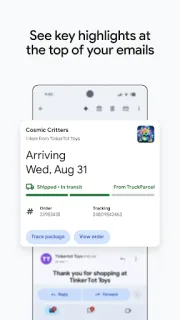
Patchy signal changes my expectations. A search that needs server access may not return everything I need, so I locate important threads before leaving. I open the latest message and read the actual time, location, and requested documents. Summary cards can surface useful details, but I would not substitute a card for the recruiter's full instructions. The next safeguard is keeping that thread easy to recognize.
Part 1 · 3 of 33. A star marks importance, not offline availability
I star the thread for the next interview because it gives me a short route through Menu > Starred. What I would not do is assume that starring pins the message or its attachment to the phone. It is an organizational marker. Before travel, I open the conversation while connected and check that the essential text remains visible after the connection drops.
Attachments deserve a separate check. A visible filename is not proof that the document is stored locally, and a link to cloud storage still depends on access to its destination. For an interview brief, I use the attachment's save control where available and verify the local copy in Files. That small distinction between seeing a message and possessing its document shapes my whole offline workflow.
Many applications, one dependable preparation habit
I would choose Gmail for a job search if I could regularly reconnect and wanted strong search, separate accounts, and familiar conversation threads. It suits preparing tomorrow's interview messages tonight better than retrieving an entire application history without reception. If I needed a guaranteed local archive of every message and document, I would look for a tool explicitly built around that requirement. Gmail remains useful in that situation, but I would give it a narrower role.
The listing, as we read it
- Developer
- Google LLC
- Version
- Varies with device
- Updated
- Nov 5, 2026
- Installs
- 10,000,000,000+
- Rating
- 4.1 out of 5
- Content rating
- Everyone
- Category
- Communication
- On Google Play since
- Sep 21, 2010
- Price
- Free
- In-app purchases
- No
- Ads
- Yes
Source: Google Play listing for com.google.android.gm · read Nov 9, 2026
Google LLC publishes Gmail, and the Google Play listing flags ads and free installation. I read that as an accessible starting point, not a promise that every listed capability is included without a subscription. The named Gemini features require an eligible paid plan and an internet connection, making them secondary to this offline-focused job search.
The update notes emphasize chat, spaces, and voice or video calls alongside email. I see the appeal for interview coordination and video conferencing, but those additions do not solve weak reception. For this review, dependable access to the invitation matters more than the number of collaboration surfaces inside the app.
Before reception drops: the checks I would make
Part 2 · 1 of 44. Check sync before blaming recruiter silence
If I were expecting an interview reply, I would check Menu > Settings > the application account > Notifications and choose the level appropriate for that inbox. I would also inspect Android Settings > Apps > Gmail > Notifications. Names can vary across Android devices, but the distinction matters: Gmail's account preferences and Android's permission both affect whether an arriving message gets my attention.
If mail appears only when I open Gmail, I would inspect that app's background battery and data permissions in Android settings. Restrictive settings can delay synchronization, while no setting can create a connection where reception is absent. I prefer checking these controls before an interview day rather than repeatedly refreshing an empty inbox. Then I verify the conversation directly instead of treating silence as a decision.
Part 2 · 2 of 45. An offline reply is not a delivered reply
I can write a response when reception disappears, but sending still needs a connection. A message may wait in Menu > Outbox until Gmail can transmit it. For an interview acceptance, I would reconnect, let synchronization finish, and check Menu > Sent. Even appearing in Sent confirms sending rather than the recipient reading it; an acknowledgment remains a separate event.
This is where I resist treating Gmail's Android app like a fully stocked offline mailbox. Recent synced text may remain readable, but older messages, unopened content, and attachments can require the network. Increasing the sync window helps preparation without making every item dependable offline. I would prepare the specific invitation and documents I need, rather than assume the entire application history travels with me.
Part 2 · 3 of 46. Build a departure checklist around one interview
My departure checklist starts with the newest recruiter message, not the first invitation in the thread. I check for a changed entrance, a revised time, or a replacement meeting link. Then I star the conversation, open any relevant attachment, and save the essential appointment details in a calendar entry. If the message offers an applicable calendar action, I still review the resulting details before relying on them.
I also separate preparation material from arrival instructions. Emails about online courses may be useful for interview practice, but they should not crowd the short list I need outside the building. I would keep the address and contact name in an accessible local note, using only necessary details. Before leaving, I check that note and the saved documents without a connection. That makes the fallback concrete.
Part 2 · 4 of 47. Use a tracker for status, Gmail for evidence
Gmail threads answer what a recruiter actually wrote; they are less comfortable as a complete application tracker. I would keep a simple table for employer, role, next action, and deadline, then return to Gmail for the conversation. That is lightweight project management without expecting unread status to mean action required. Reading a message should not accidentally erase the reminder to respond to it.
Compared with relying on a browser tab, I prefer the Android app for account switching, notifications, and access to already synced mail. Compared with a locally saved interview sheet, however, Gmail has more dependencies: synchronization, thread selection, and attachment availability. I would use both rather than declare one sufficient. The app organizes correspondence; the small local fallback carries the details I cannot afford to lose.
Keep Gmail central, but prepare the journey separately
My strongest reason to use Gmail here is the combination of search and account separation. It gives me a practical route back to the employer's exact words without turning every application acknowledgment into a task.
My reservation is the gap between visible mail and dependable offline access. I would keep Gmail at the center of correspondence, but prepare each interview's address, documents, and contact details before reception becomes uncertain.
What I like
- Search narrows crowded application threads.
- Multiple accounts separate job-search mail.
- Synced message text can remain accessible offline.
- Stars provide a quick shortlist of interview threads.
What I'd change
- Older or unopened content may need reception.
- Attachments need their own availability check.
- Queued replies require follow-up after reconnecting.
Gmail FAQ
Can I read Gmail on Android without reception?
I can read mail already available on the device, but I would not expect the whole mailbox. I check the important conversation offline before depending on it.
Does starring an interview email save it offline?
No. I use stars to find conversations quickly, not as an offline storage control.
How do I check whether my acceptance was sent?
After reconnecting, I check Menu > Outbox for waiting messages and Menu > Sent for the reply. I look for the recruiter's acknowledgment separately.
Where do I change the mail sync window?
For a supported Gmail account, I open Menu > Settings > the account > Days of mail to sync. I also check that Sync Gmail is enabled.
Will an interview attachment open offline?
I would only rely on it after saving a local copy and opening that copy without a connection. A filename in the message is not enough.
 How-toGmail
 Best picksIXL