Sony Sound Connect settings keep changing? Try these fixes
I’ll show you how to stop noise cancellation or sound settings from changing unexpectedly, starting with the quickest checks.
Aaron HaleReviewer · published Oct 18, 2026 · 6 min read
01Noise cancellation changed on the train? Check this first
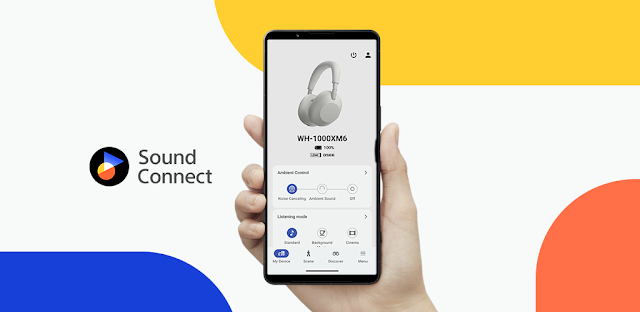
I switch on noise cancellation before a train ride, then hear platform announcements coming through. My first check is Sony | Sound Connect, not the phone’s volume buttons. If the app shows a different noise cancellation or ambient sound setting from the one I chose, I look for an automatic setting before assuming the headphones have a fault. That distinction matters: a setting that changes with my situation needs a different fix from one that never sticks.
The most likely cause is an automatic switch based on what I’m doing or where I am. Next I check whether I touched a headphone control, changed the setting on another connected device, or switched to a sound profile that feels different. A weak connection or an interrupted device software update comes later on my list. I work through those possibilities in that order so I don’t reset anything unnecessarily.
Before changing controls, I put on the headphones and play something familiar at a comfortable level. I note the current noise cancellation mode, the ambient sound level and whether the equalizer is active. If I’m moving between a laptop and my phone, I also note which device is playing. These three observations make the next change easier to judge: did the mode move, did the sound profile move, or did playback move?
02Check automatic switching before you touch Bluetooth
Sony | Sound Connect can switch noise cancellation settings in response to a situation on compatible headphones. That is useful when I want to hear traffic while walking, but confusing when I expect one fixed setting. I open the connected headphone’s controls in the app and look for an automatic sound-control option. The exact labels can vary by device and app layout, so I follow the control’s purpose rather than relying on one screen name.
I make one change at a time, then repeat the situation that caused the surprise. My quick-check order is:
Open Sony | Sound Connect and select the connected headphones.
Find the automatic control for noise cancellation or ambient sound.
Turn off that automatic control temporarily.
Choose the noise cancellation or ambient sound setting you want.
Walk, sit or resume playback as you did when it changed, and watch the app.
If the setting now holds, I turn automatic control back on only if I want it. Then I adjust its available situations rather than leaving it in charge of every transition. I also check any automatic playback or audio notification options shown for my headphones: a notification can make it seem as though the listening mode changed when playback was simply interrupted. If nothing moved in the app, I check the headphone controls next.
A touch surface or button can change listening modes without a trip through Sony | Sound Connect. I’ve brushed a headphone while adjusting its fit, then blamed the app for the result. I check the headphone controls shown in the app, if available for my device, and identify the action assigned to switching noise cancellation or ambient sound. I also pay attention to any spoken cue or tone that accompanies the change.
To separate an accidental press from an automatic switch, I set the mode I want and keep my hands away from the headphones while I repeat the activity. If it stays put, I try the physical control deliberately and compare what happens. A consistent response to touch points to the control, not a connection problem. I can then change an available control assignment or adjust how I handle the headphones.
This check matters with wireless earbuds, which are easy to touch while reseating them. It also matters when I put on a hood or lean against a seat. I avoid changing several control assignments at once; otherwise I won’t know which action fixed the problem. If the mode changes without contact, I move to the connection and playback checks instead of repeatedly toggling the same setting.
04If the sound changes, check which device is playing
Not every sudden sound change is a noise cancellation change. If music starts from a laptop instead of my phone, the source itself may sound different. I pause playback on the other device and play the same track from one device only. Then I compare the mode displayed in Sony | Sound Connect before and after the change. If that mode stays put, I stop troubleshooting noise cancellation and focus on playback.
The equalizer is my next check. In the connected headphone’s sound controls, I look at the selected equalizer setting and compare it with what I noted earlier. A change there can alter vocals and bass enough to resemble a change in ambient sound. I return to one familiar equalizer choice, then listen without switching tracks or apps. Keeping the source steady makes the comparison useful.
I also separate a connection dropout from a setting change. If audio briefly stops, resumes, or moves to the phone speaker, I check that the headphones still show as connected in the phone’s Bluetooth settings and in Sony | Sound Connect. If the connection is unstable, I first move the phone close to the headphones and away from a crowded Wi-Fi router. A stable connection gives the app a fair chance to show the actual setting.
05Reconnect cleanly if the app and headphones disagree
If Sony | Sound Connect shows one mode but the headphones seem to behave differently, I close and reopen the app, then confirm it is showing the headphones I’m wearing. I switch the headphones off and on as well. This is a quick way to refresh what I’m seeing without wiping my preferences. I check the displayed mode again before making another change.
If that fails, I disconnect the headphones in the phone’s Bluetooth settings and reconnect them. I leave any other paired playback device idle during this check. Then I open Sony | Sound Connect, choose the headphones and set the listening mode once more. I play audio from the phone and watch whether the displayed setting follows what I hear. I do not remove the pairing unless this simpler reconnect fails.
Removing the Bluetooth pairing is a more thorough step because I may need to set up the headphones again. If I reach it, I first note my equalizer and control choices. I then use the phone’s Bluetooth settings to forget the headphones, pair them again using the headphones’ pairing instructions, and reopen Sony | Sound Connect. If the setting holds after a fresh pairing, I restore my preferred choices one at a time.
06Still changing? Check device software, then reset last
Sony | Sound Connect supports software updates for compatible headphones. If the app offers one for my connected device, I follow its on-screen instructions and keep the phone and headphones close together during the process. I avoid starting it when I need the headphones immediately. Once it finishes, I choose a noise cancellation mode and repeat the activity that triggered the change. The latest app notes describe interface improvements, so I pay attention to control labels rather than expecting a particular fix.
I consider a headphone reset only after the automatic settings, controls, source device and connection checks. Reset procedures differ by headphone model, and some erase pairing or personalized choices. I use the instructions for my exact model, write down the settings I want to restore, and pair the headphones again afterward if needed. Then I test with automatic switching left off; that keeps the first post-reset check simple.
If the problem remains, I record what changes and when: the mode shown in the app, whether I touched a control, which device was playing, and whether the headphones stayed connected. I would use that short sequence when seeking device-specific support rather than repeating resets. The useful dividing line is whether the app’s mode visibly changes or the audio merely sounds different; it determines which setting deserves attention next.
The takeaway
I’d first turn off automatic noise cancellation switching temporarily, choose one mode, and repeat the moment when it changed. If the mode holds, adjust the automatic controls before trying a reset.
For more practical app guidance, continue to this site’s Sony page just below.
Past The First Look is independent and not affiliated with Sony Corporation. This guide reflects the reviewer's own setup; menus can differ by device and version.

 TroubleshootingAI Piano Magic Keyboard

 TroubleshootingGroupon

 TipsWalmart
 How-toSamsara Driver

 TipsDrink Alarms

 TroubleshootingLED Light Controller &
 TipsBrowser TV Web

 How-toDSW Designer Shoe

 TipsSoccer Live Scores
 Best picksIXL
 How-toGmail