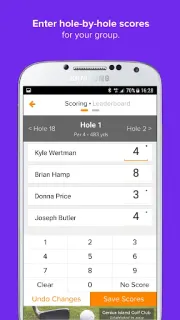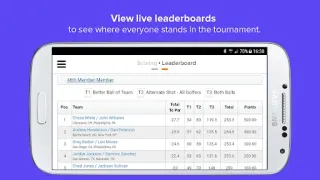
You’re at the first tee, your group is paired up, and someone wants to know where the latest scores stand. Golf Genius is built for that handoff: golfers can check event pairings and tee times, enter scores from a phone while playing, then follow a leaderboard as scores come in. It makes most sense when the organizer already runs the event through Golf Genius; it is not a general golf tracker that becomes useful without an event to join.
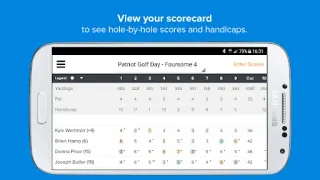
The app brings several event tools into one place. Tee sheets show round pairings and tee times; hole-by-hole scorecards let players review each group’s progress; and live scoring feeds the real-time leaderboard. Organizers and PGA Professionals can use it to handle scoring, results and statistics. Players may also access a custom event or league website with results, photos and a message board, and upload course photos to its gallery. That mix can keep a group’s basic event information together instead of scattered across messages.
The first-ten-minutes catch is access: you need an event or league connected to Golf Genius, and the features you can use depend on the organizer’s setup. Start by asking the organizer which event to open and whether you’re expected to enter scores or just follow them. The app is free to install, so check with the organizer about any event or league costs before committing. Allow photo access only if you plan to upload pictures, and check the app’s permission prompts against what you intend to do.
Install Golf Genius if you play in events or leagues that use its tools, or if you organize rounds and want mobile scoring, pairings and results in one workflow. Skip it if you want a standalone score tracker or have no Golf Genius event to access; its social features and leaderboard need that event context to matter. If you’re ready to check whether it fits your next round, use the Google Play button just below.