
You spot a pair of boots online, but your local store is across town. DSW’s app lets you check whether the shoes you want are available before you visit, then buy in the app and pick up in store. That stock check can make a shopping trip feel less like guesswork—especially when you need a particular size or color.
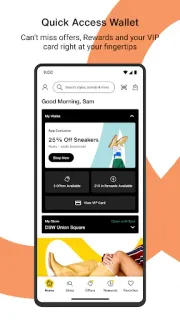
The app covers shoes, handbags and accessories for women, men and kids. You can browse brands, use the streamlined checkout, check store locations and hours, and get directions. DSW VIP members can view account details, points and available Rewards; the app can also scan a VIP card and offers for use in store, in the app or online. In-store tools include scanning shoes to add them to your bag, a Clearance Calculator to see the price you’ll pay, and product scanning when you can’t find your size or color.
The app is free to install, but shopping is not free: purchases, delivery choices and any applicable charges depend on what you order and the options shown at checkout. The store listing identifies no subscription fee, so I’d treat VIP Rewards as a membership feature rather than assume a paid plan is required. Account access is relevant for members who want to track points or Rewards. Features such as scanning and pickup also depend on being in a DSW store or choosing an eligible store and item. For a year-cost check, review your expected shoe spending, shipping or pickup choices, and any in-app purchase details shown on Google Play before installing.
Install it if you shop DSW often, want to check store availability before leaving home, or use VIP Rewards and in-store scanning. If you’re comparing prices across retailers, seeking a general price comparison tool, coupons from multiple shops, gift cards, cashback or delivery tracking, this app is focused on DSW shopping rather than those broader needs. Skip it if you rarely shop at DSW and don’t need its store tools. Check the Google Play button just below to open the listing.


 How-toDSW Designer Shoe